
Before you start
- The module is called Controlled Change in your menu (this help calls it Change Control). It is there when the module is enabled for your company by Complere. Its records are Change Requests.
How it works
A change request passes through its statuses from Initiated to Closed. The Change Control module page shows them in order; select a status there to see who acts in it. Each change request names people in these roles:
| Role | What they do on the change request |
|---|---|
| Initiators | The person who created it. Can send it on from Initiated. |
| Coordinators | Send it on from Initiated, add changes, and record the effectiveness review. |
| Approvers | Sign in Awaiting Approver sign-off. |
| QAs | Authorise the changes, sign Awaiting QA sign-off and verify effectiveness. |
For the Approvers' and QAs' signatures step by step, see Sign a change request as Approver or QA.
A signature moves the change request on. Only people named in the role acting in the current status can sign; named in two such roles, you pick your Role. The dots under the button show its progress.
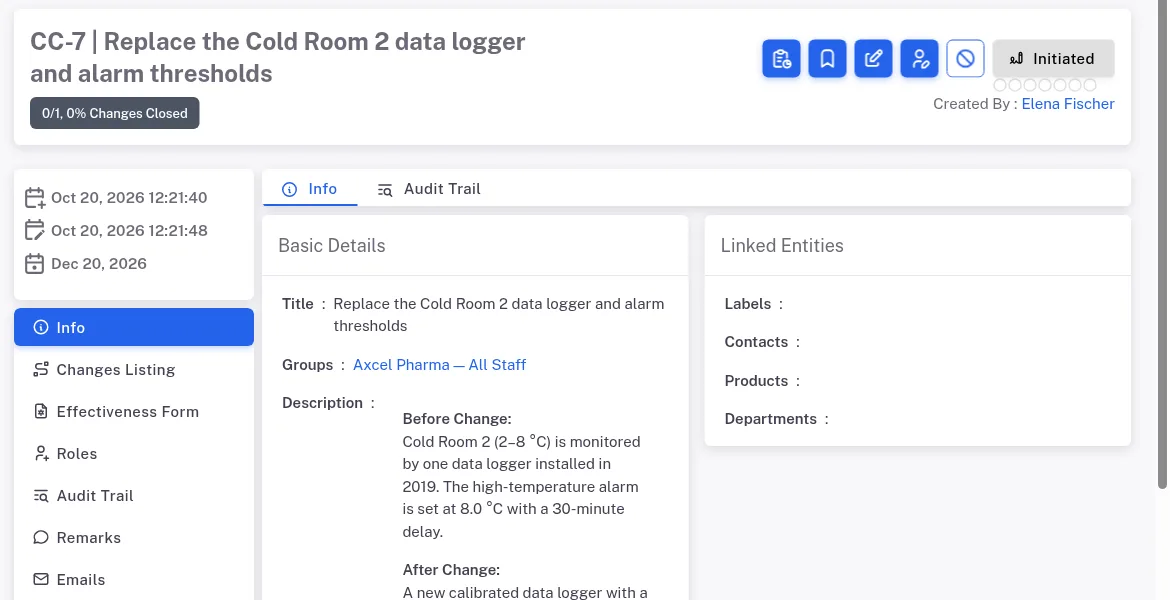
Step 1. A change request in Initiated: the status button at the top of the page and the Info tab The changes are the work. In Implement Changes each change on the Changes Listing tab has its own Coordinators, QAs and statuses: In Progress, Awaiting Dependency, Awaiting QA sign-off, Closed. See Close a change of a change request.
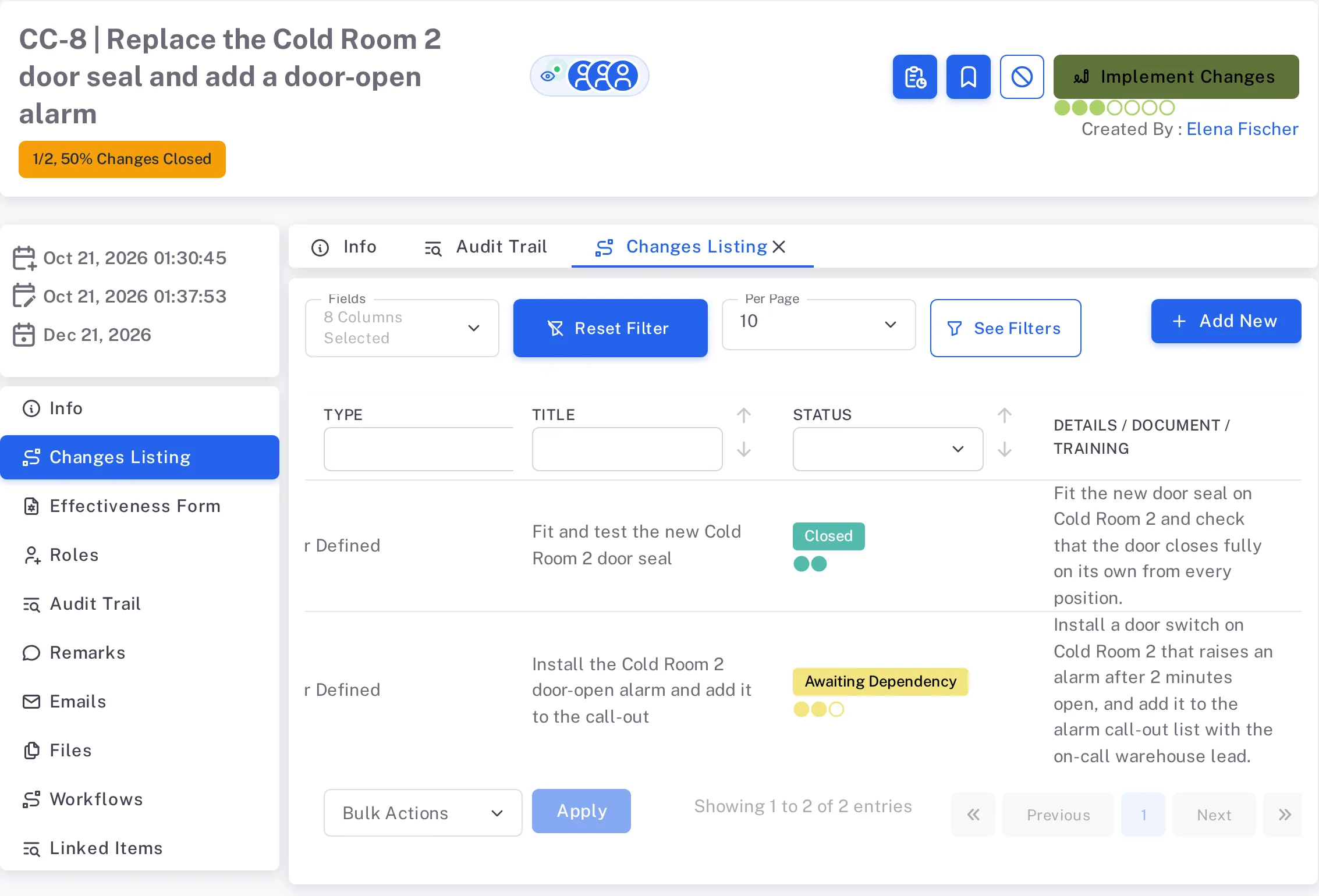
Step 2. The Changes Listing tab of a change request in Implement Changes: one change Closed and the change that depends on it in Awaiting Dependency, with the counter 1/2, 50% Changes Closed under the title The change request moves on by itself when every change is Closed. It goes to Awaiting QA sign-off unsigned; the Audit Trail lists the move as Auto-advanced.
In Awaiting QA sign-off, the QAs sign. They sign the change request on to Awaiting Effectiveness Review; their Escalate panel also offers Escalate status to Closed. See Sign a change request as Approver or QA.
Effectiveness is reviewed, then verified. A Coordinator answers Was the action effective? (Record the effectiveness review of a change request). Yes sends the change request to Awaiting Effectiveness Verification, where the QAs close it (Close a change request); No sends it back to Awaiting QA sign-off.
A change request can go back. An Approver sends it to an earlier status with a Reason (the QAs' Escalate panels also offer moves back); a Coordinator sends it back by answering No. The Audit Trail lists it as Status Rejected. After Closed the button is greyed.
Result
You can read where a change request is and who acts next:
- The status button shows the current status; its dots show how far the change request has come.
- The Roles tab shows who is named in each role.
- Changes to the change request are listed on its Audit Trail tab, which is shown to users who are allowed to see it. See Read the audit trail of a record or a module.
- Next: every action and the roles that can take it, status by status, in Controlled Change: who can do what.
If something is different
- The status button is greyed out. You are not named in the role that acts in this status. Open the Roles tab.
- The status button cannot be used in Implement Changes. Not every change is Closed yet. Open the Changes Listing tab.
- A change shows Awaiting Dependency and its Escalate button is greyed. A change listed under its Closure Dependencies is not Closed yet.
- A status on the Change Control module page never appears. A status marked Optional on the module page is not used on every record. The QAs' panel in Awaiting QA sign-off also offers "Escalate status to Closed".